
MenuClose
24H HOME CARE · FAMILY PORTAL
24H Family Portal
Make authorization, care hours, renewal, and coverage visible before uncertainty becomes a break in care.
A ten-week team project grounded in stakeholder Q&A, domain research, personas, end-to-end journey mapping, low- and mid-fidelity iteration, client feedback, high-fidelity flows, and a prepared usability study.

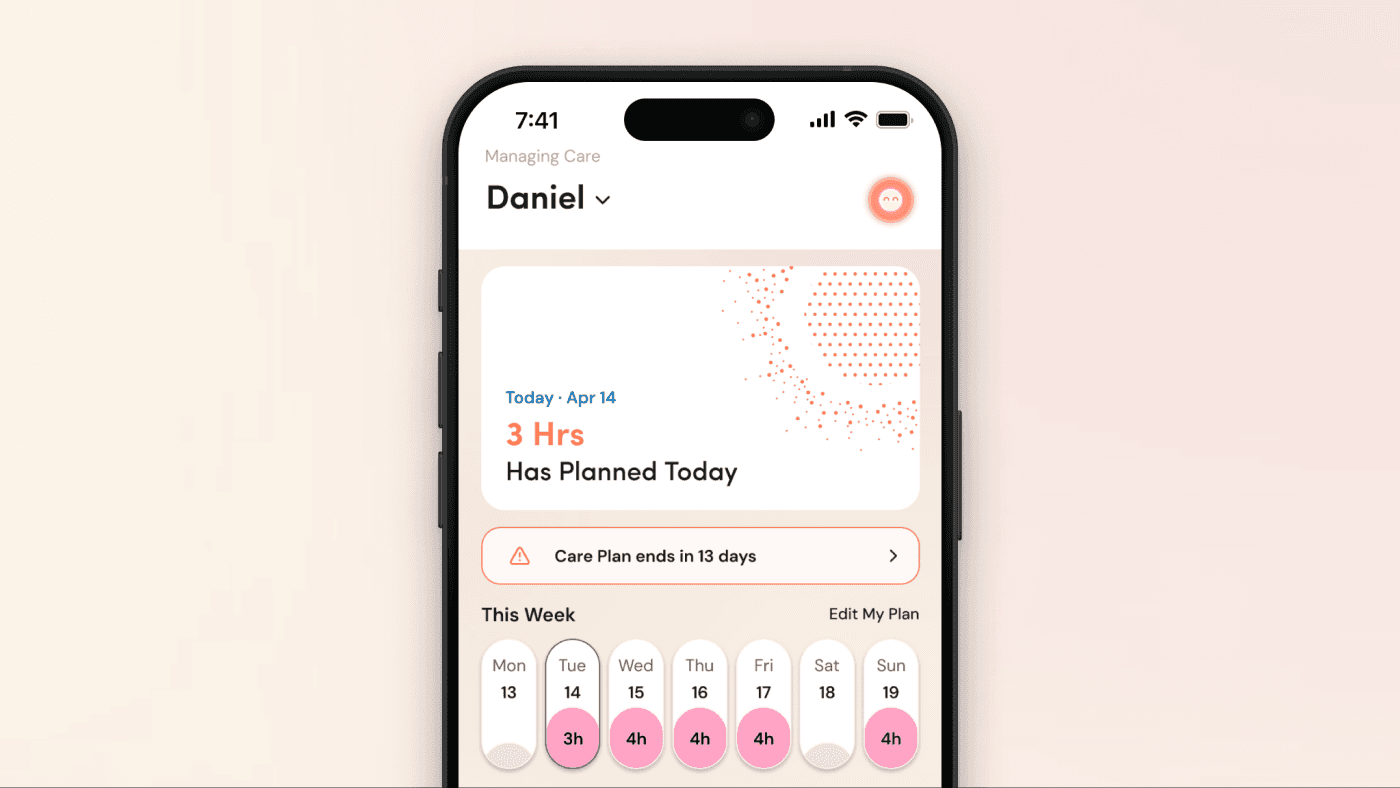
The same family-facing state is explored in a calm daytime surface and a lower-light planning mode.
CONTEXT + SYSTEM COMPLEXITY
The visible interface was only the last layer of the problem.
Families were navigating overlapping program rules, caregiver models, authorization limits, visit records, renewals, and agency handoffs. We first had to understand who owns each action and where uncertainty enters the service journey.
State was scattered
Status, dates, used hours, remaining hours, and renewal readiness lived across calls, email, and personal notes.
Roles overlapped
One family member could be the caregiver, point of contact, and person responsible for authorization deadlines.
Programs diverged
Community Supports and Disability Services shared needs, but their authorization horizons and renewal paths were materially different.
Silence felt risky
After a high-stakes submission, families needed confirmation and an honest external-review state—not another invisible queue.
The design challenge was not “how do we add a dashboard?” It was “how do we make care continuity legible across people, programs, and time?”
INITIAL RESEARCH
We mapped the service before naming the product opportunity.
The board contains care-mode comparisons, service-path differences, stakeholder questions, authorization and reauthorization research, adjacent-product references, and needs / pains / behaviors across points of contact, caregivers, and people receiving care.
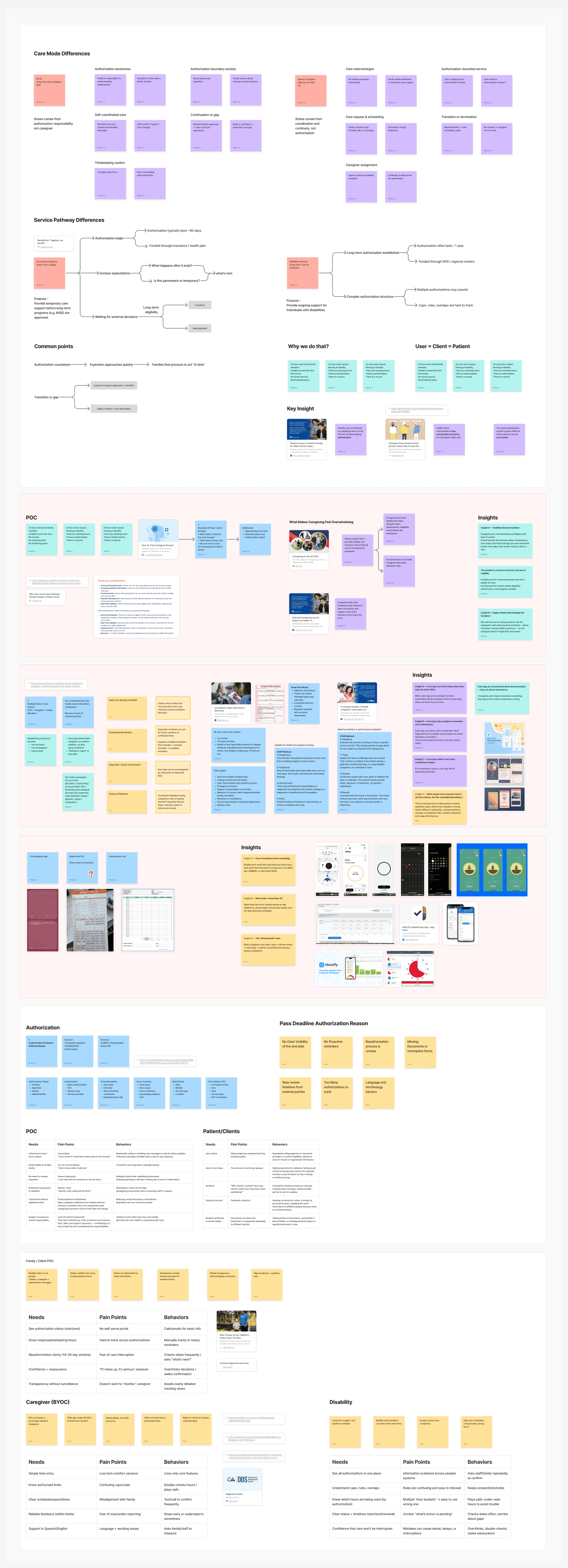
- Care-mode comparison: where BYOC and agency responsibilities diverge
- Service-pathway maps: CS and DS authorization horizons side by side
- Role-based needs, pains, and behaviors that feed the decision rows below
Terminology and service rules
We clarified CS, DS, POC, BYOC, agency care, authorization windows, renewal responsibility, and the limits of what a family-facing portal can promise.
Care and authorization journeys
We studied how application, assessment, approval, daily care, timesheets, reporting, payment, and renewal connect over time.
Portals, benefits, EVV, scheduling
We compared proxy access, status timelines, hour tracking, time entry, shared calendars, and notification models instead of copying one competitor.
Needs, pains, behaviors
We translated the research into role-specific tensions and then into a shared product model for status, ownership, timing, and next action.
Families repeatedly check because status and responsibility are not visible.
Make authorization state the product spine.
Every primary surface keeps current status, dates, hour allowance, and next action visible.
Care plans, schedules, and logs feel disconnected from authorized hours.
Connect planning to utilization.
The weekly plan shows what is used, planned, at risk, and still available before confirmation.
External review continues after the family has completed its own step.
Close the uncertainty loop without overpromising.
Show submitted, received, under review, and no-action-needed states separately.
PERSONAS + ROLE RELATIONSHIPS
A single household could contain several product roles.
The personas were not decorative demographics. They helped us see where the same person could be a family member, caregiver, point of contact, and authorization manager—and where a staff or agency handoff must remain explicit.
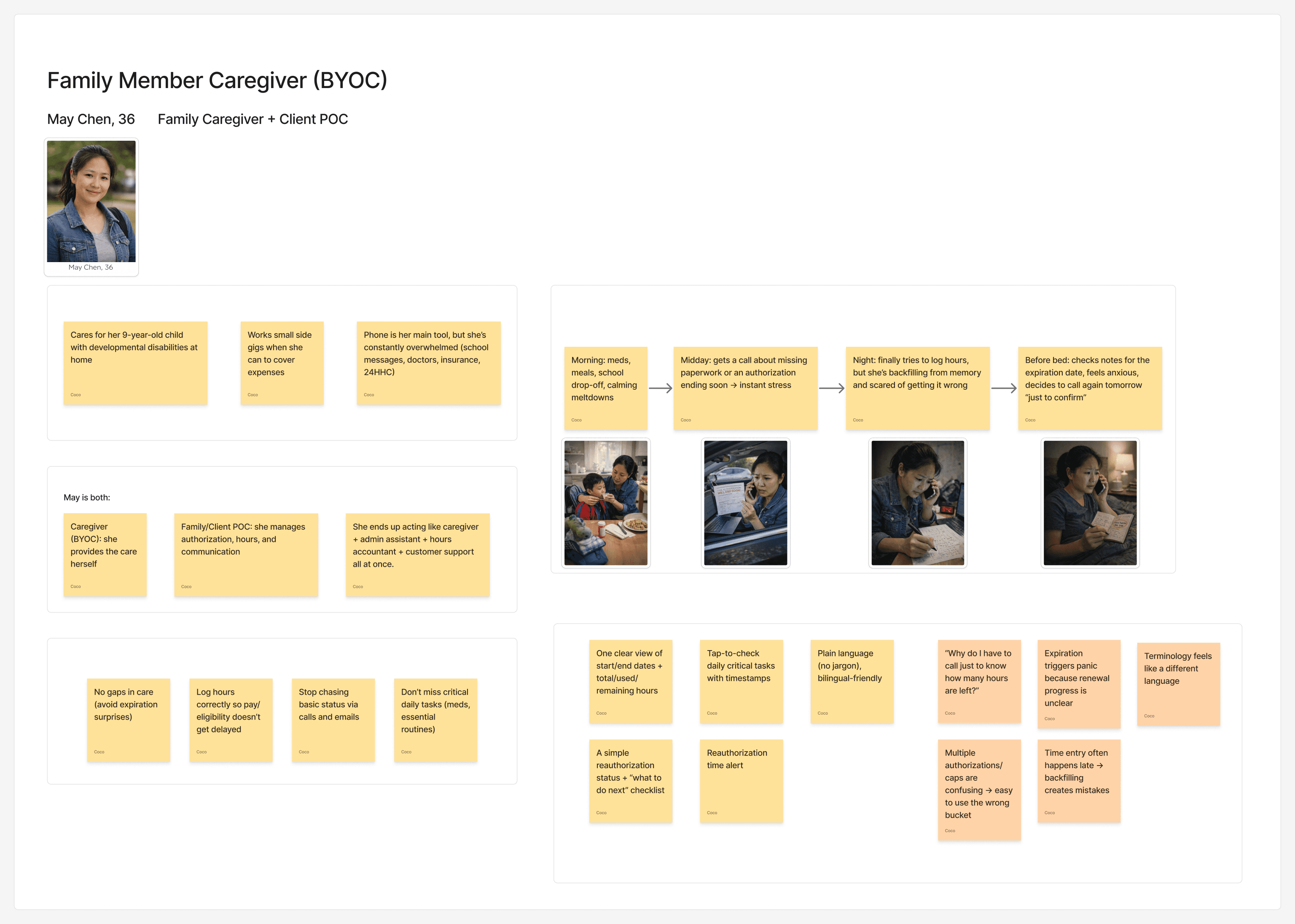
WHY THIS PERSONA CHANGED THE MODEL
“Family” is not one permission set.
- As family: May needs confidence that care will continue.
- As caregiver: she needs fast logging and understandable hour boundaries.
- As POC: she needs documents, dates, and ownership of next steps.
- During agency coverage: she needs a safe handoff without repeating the whole care story.
Design response: preserve the person and authorization context across Home, Schedule, Care Plan, messages, and renewal—not in isolated feature silos.
END-TO-END JOURNEY
The journey made the renewal boundary impossible to ignore.
We mapped realization, application, authorization, daily care, reporting, payment, and renewal—not just the moments that happen inside an app. The emotional trough appears when people cannot tell what is active, what is expiring, and who must act next.
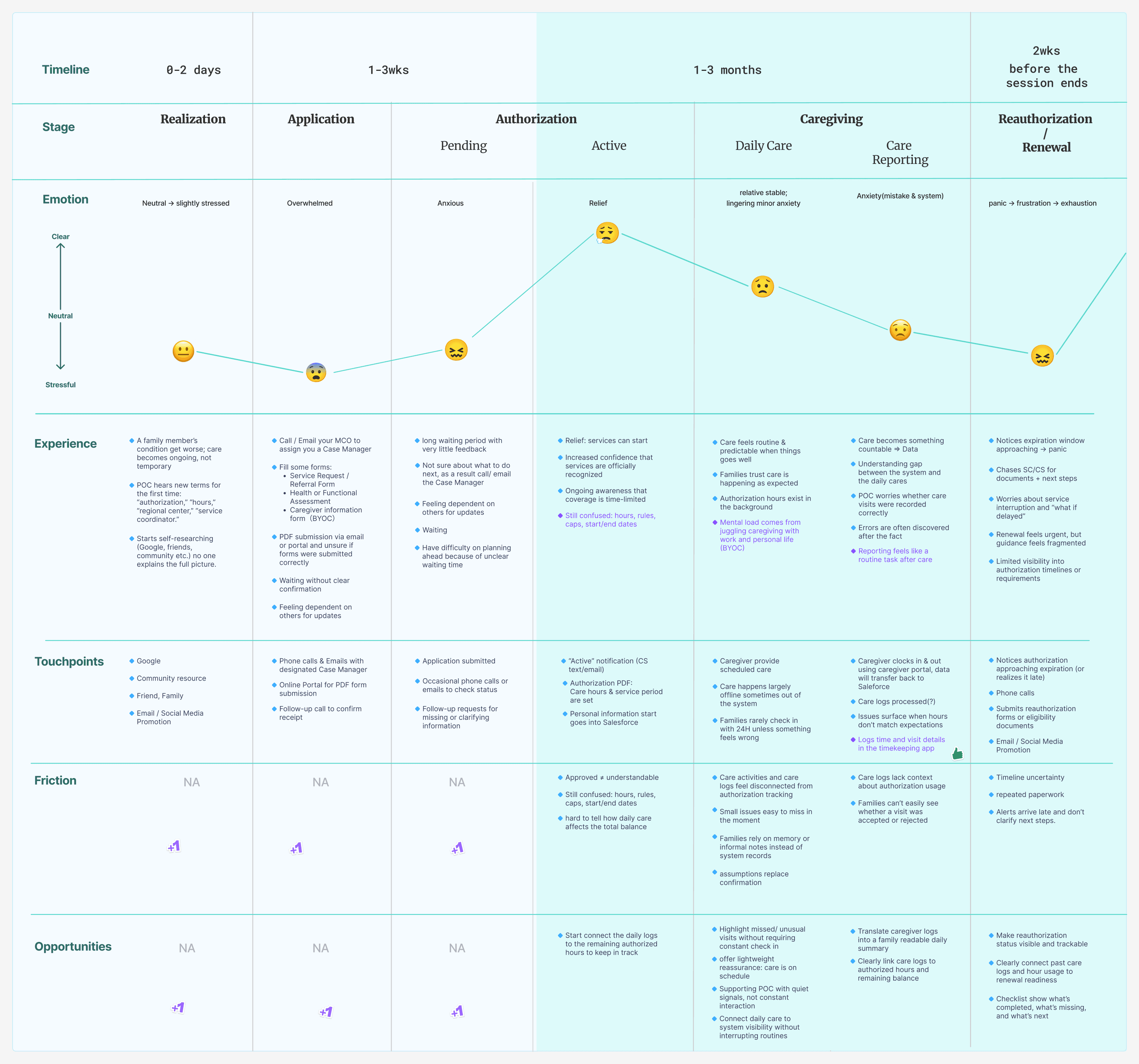
- The emotion line dips hardest at authorization boundaries
- Touchpoints stay offline—calls, email, PDF forms—through every stage
- Opportunity notes on the right seed the HMW statement below
Authorization boundaries
Uncertainty rises before start, expiration, renewal, or a change in caregiver coverage.
Manual reassurance work
Families call, email, save notes, and check repeatedly when the system cannot explain its own state.
One legible state model
Connect current state, timing, responsibility, and confirmation across the full journey.
Help families see authorization status, remaining hours, renewal timing, and the next action early enough to protect continuity—without making them learn the organization’s internal structure?
LOW-FIDELITY EXPLORATION
We used low-fi to expose missing states, not to decorate a flow.
The low-fidelity boards explore waiting, active, expiring, no-action-needed, clock-out, care-log, history, notification, utilization, and care-progress states. That breadth is essential because a healthcare portal fails when only its happy path is designed.
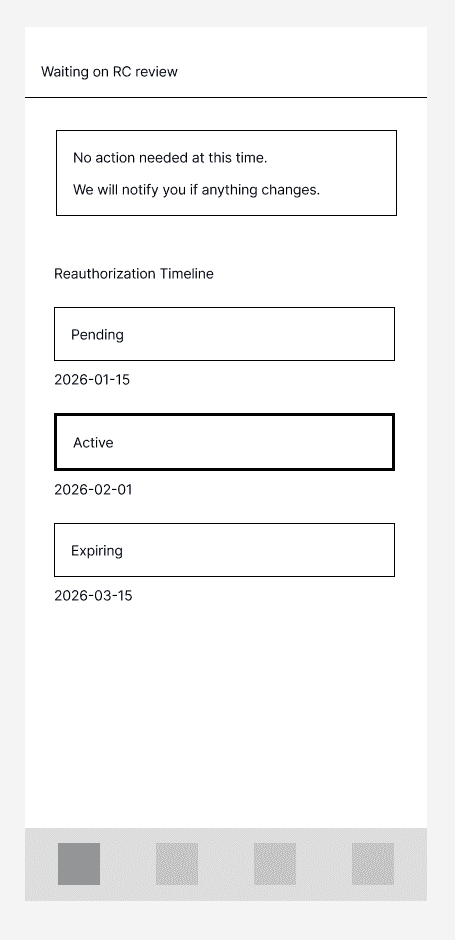
Reauthorization timeline
Pending → Active → Expiring with real dates—plus a “no action needed” banner when waiting is expected.

Clock-out + care log
Time summary and the day’s care tasks land in one submit action.

Care history
Month view with per-caregiver visits—and days without care called out.

Hours usage calendar
Remaining vs used hours against the monthly cap, day by day.
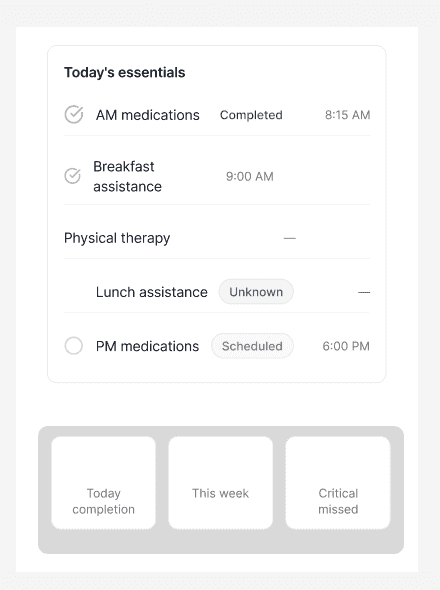
Today’s essentials
Care progress with completed, scheduled, and unknown states.
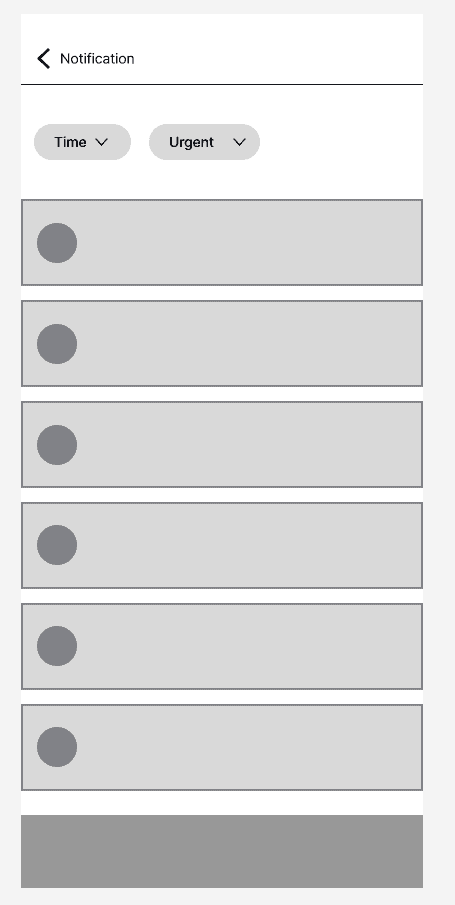
Notification triage
Time vs urgent filters, so attention goes where it’s needed.
Six of the explored states, cropped from the original working board. The board’s sticky notes record open questions—not conclusions.
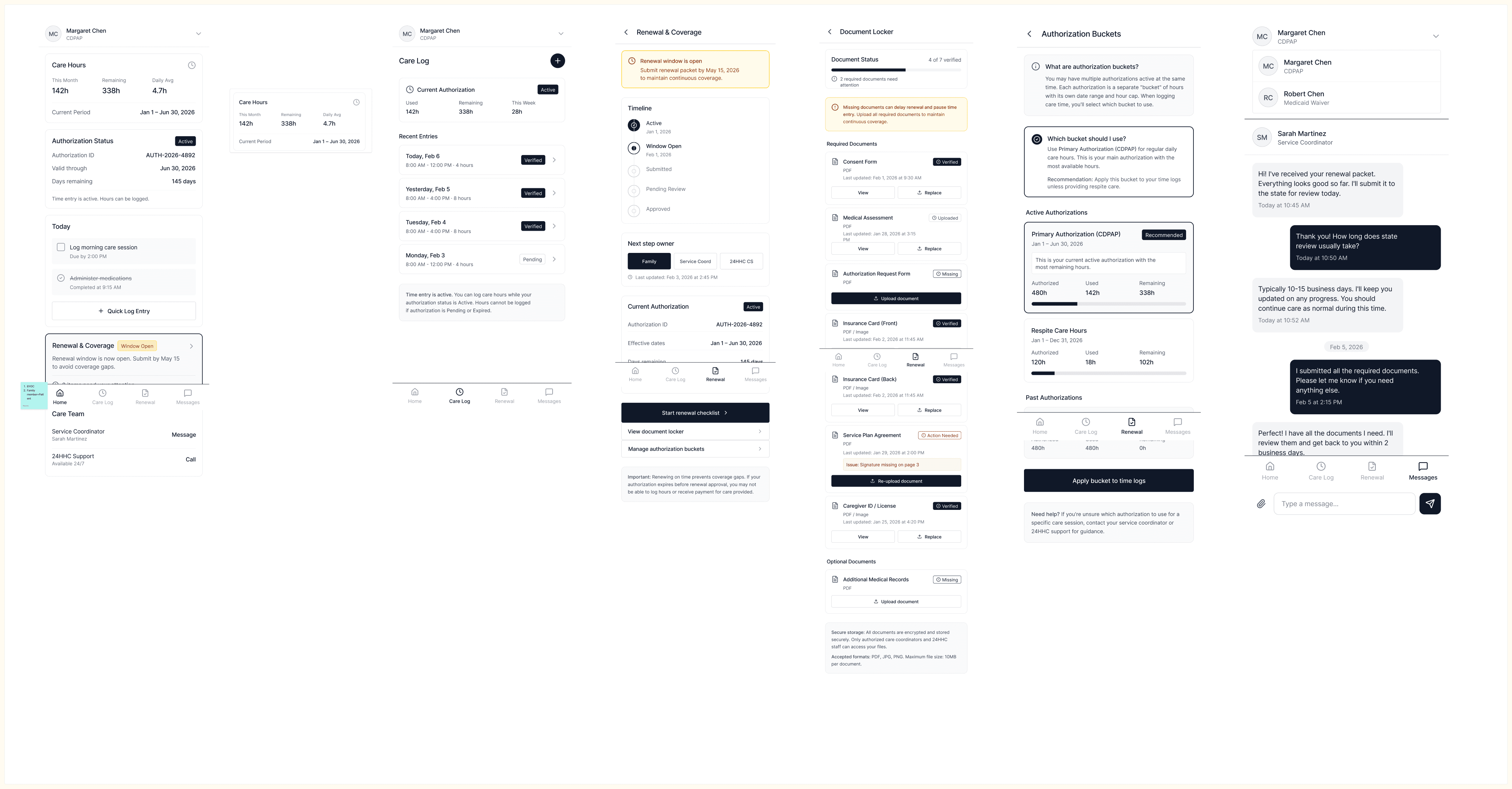
- Authorization buckets connected to renewal and document status
- Weekly planning linked to coverage requests and messaging
- Exception handling designed before any visual styling
Persistent authorization context, remaining hours, clear dates, and explicit next actions.
Dense operational detail was reduced; high-stakes states were separated from routine daily care.
We added confirmation, no-action-needed, delayed review, agency handoff, and exception states.
WIREFRAME BREAKDOWN
The dashboard became a decision surface, not a summary screen.
We broke the experience into Home, renewal states, caregiver requests, upcoming visits, visit history, and care-progress views. The goal was to keep one next action visible while preserving the larger authorization context.
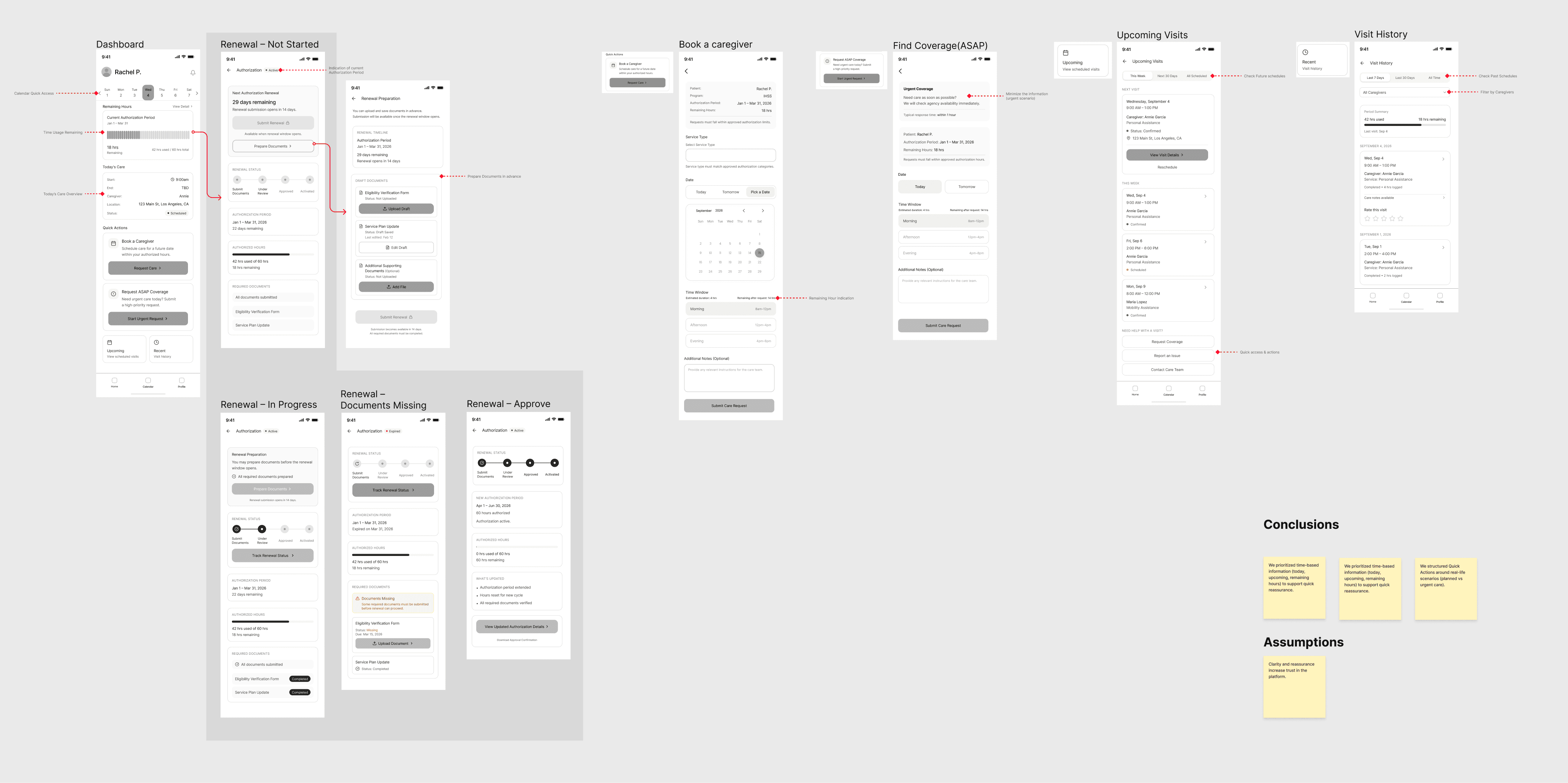
Current state first
Show what is active and what needs attention before secondary navigation.
One next action
Renew, review, confirm, schedule, or wait—do not make users infer the next step.
Care context persists
Person, program, dates, and hour limits remain visible across handoffs.
MID-FIDELITY + CLIENT FEEDBACK
Mid-fi connected the system; stakeholder feedback challenged its assumptions.
We explored Home variants, widgets, notifications, weekly planning, caregiver requests, renewal, feedback, and Profile. Midterm feedback then pushed the team to clarify program differences, caregiver changes, timesheets, accessibility, client engagement, and the risk of oversimplifying BYOC registration or renewal.

- Home variants testing the needs-attention hierarchy
- iOS widgets for glanceable remaining hours
- Notification structure separating Needs action from routine Updates
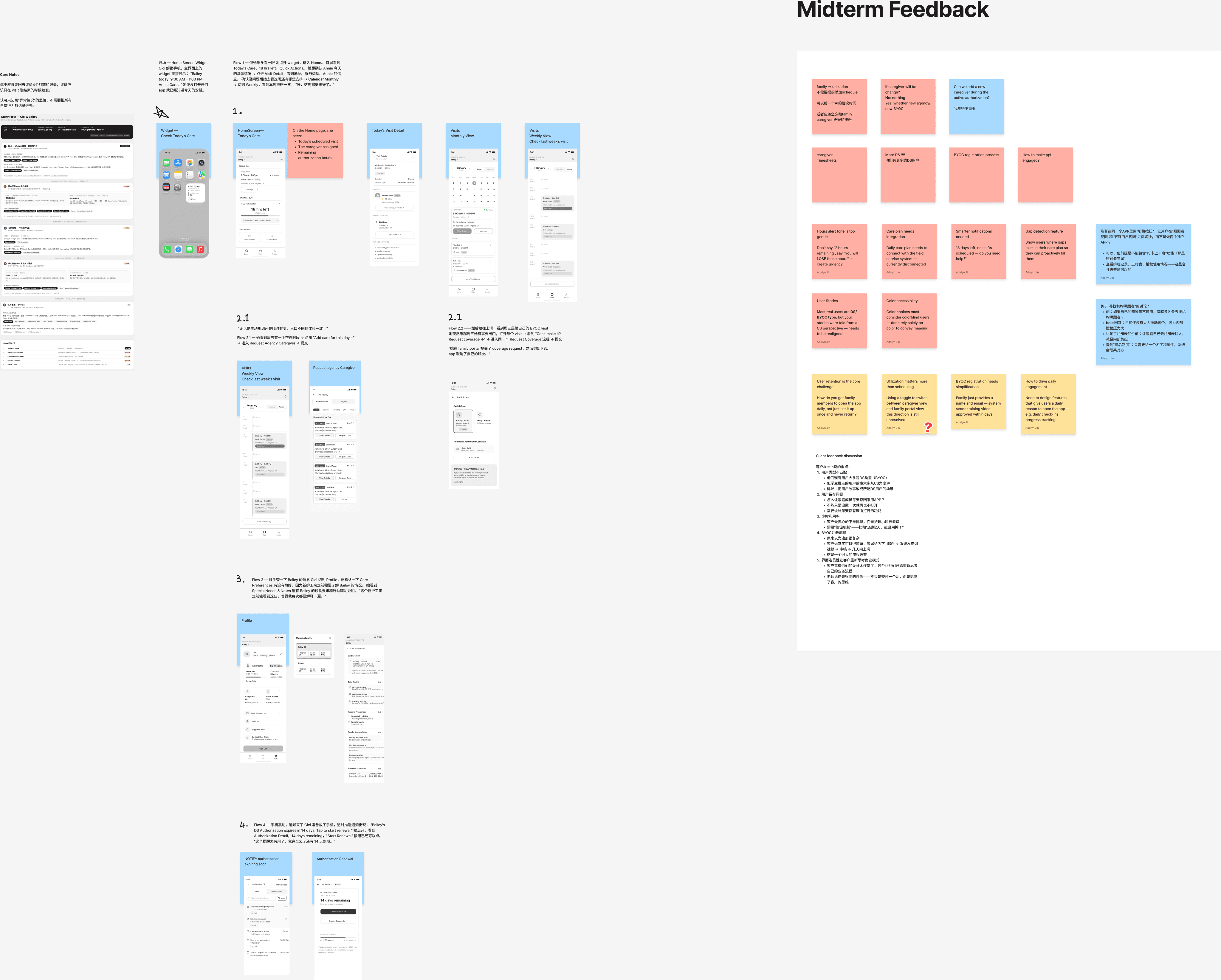
- Left: scenario flows refined after the midterm
- Right: the original feedback board, preserved verbatim
- Red and pink notes flag risks the team had to answer
CS and DS cannot share one renewal story
We separated short-term Community Supports from longer-running Disability Services while keeping shared state language.
Caregiver changes need a handoff
We connected schedule gaps to an agency request with date, time, care preferences, and confirmation.
Notifications must earn attention
Needs-action states became distinct from routine updates, with clear reason, owner, and timing.
Accessibility cannot be a color afterthought
Status is carried by label, position, and language—not color alone—and testing across comfort levels remains a required next step.
HIGH-FIDELITY PRODUCT SYSTEM
The final concept keeps authorization visible while daily care remains actionable.
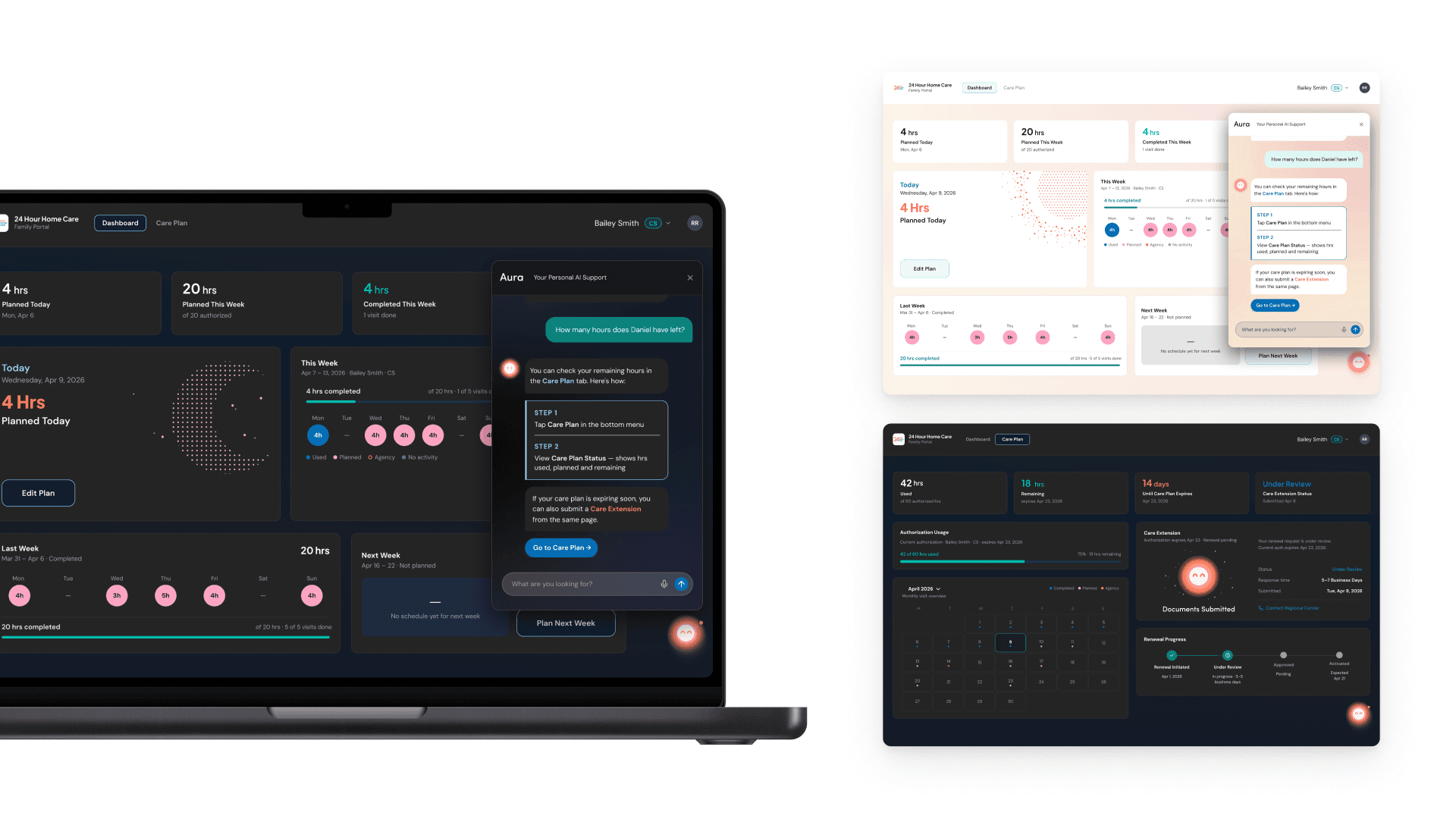
The high-fidelity system connects mobile and desktop, light and dark contexts, weekly planning, Care Plan renewal, notifications, agency coverage, and a restrained guidance layer.
RESPONSIVE PRODUCT LANGUAGE
One state model, two viewing contexts.
The visual system supports a calm light surface and a lower-light planning surface without changing the meaning of authorization, utilization, or renewal states.
DESKTOP SYSTEM · LIGHT + DARK
Authorization, weekly planning, renewal, and care-plan guidance in one high-resolution system view.
INTERACTIVE PROTOTYPE
Three scenarios demonstrate how the shared state model behaves.
Use the scenario tabs and step controls. Each flow is rebuilt as real interface content so the state, next action, and confirmation behavior can be inspected—not watched as a flattened video.
STEP 1 / 5
Plan Daniel's week without losing sight of authorized hours.
A recommendation creates a starting point; the family reviews and owns the final schedule.
SELECTED STEP
Prompt to plan
Home or the widget prompts Maria to plan Daniel's hours.
Decision: Automation proposes a plan; the family reviews and owns the final schedule.
Generate a starting plan, adjust it, protect unused time, and confirm without surrendering family control.
Prepare required documents, submit, receive confirmation, and preserve an honest external-review state.
Turn a care gap into a structured request with date, time, essential preferences, and a return to the shared plan.
USABILITY STUDY PREPARATION
The team prepared the test in detail; the supplied board does not contain synthesized results.
Week 9 documents who the team planned to meet, four approximately 15-minute think-aloud sessions, CS and DS scenarios, rotating facilitation and observation roles, open-ended prompts, and a closing confidence question. This is evidence of test preparation—not completed validation.
CS + DS points of contact
Recruiting was planned across both program contexts so the team would not generalize one authorization model to every family.
Four short moderated sessions
Opening context, approximately eight minutes of task flows, think-aloud prompts, and approximately four minutes of closing feedback.
Facilitator + two note-takers + observer
Verbatim comments, behavior, hesitation, workarounds, patterns, and timing were assigned separately to reduce interpretation during the session.
Behavior + confidence
Expected next action, confusion, surprise, missing information, and a 1–5 confidence response were prepared for capture.
Find Bailey’s remaining hours and notice that six of 18 hours may go unused.
Respond to an authorization expiring in 14 days and prepare the extension requirements.
Understand Daniel’s weekly care and remaining hours, including Wednesday and Friday gaps.
Review an approaching authorization boundary and determine whether action is required.
CONCEPT OUTCOME + REFLECTION
A coherent family-facing state model—ready for validation, not presented as released impact.
The work produced a connected concept across authorization visibility, weekly planning, renewal, multi-client care, agency coverage, responsive surfaces, and a prepared research plan.
Confidence at a glance
Current state, timing, hour limits, and the next action remain visible before a gap becomes urgent.
Clearer handoffs
Schedule changes, renewal submissions, and external review retain ownership and confirmation.
A reusable state language
Home, Schedule, Care Plan, messages, and notifications share the same status logic.
Polish cannot compensate for ambiguous operational state.
What I would do next
- Run and synthesize the four planned sessions.
- Validate CS and DS rules with program stakeholders.
- Test older adults, mixed technical comfort, assistive technology, zoom, contrast, and English / Spanish content.
- Design denial, missing-document, external-delay, expired-authorization, caregiver-match-failure, and offline states.
ORIGINAL PROJECT SOURCES